
Print MTSS Letters
1. Go to Admin and select Print MTSS Letters

2. Select your options to print
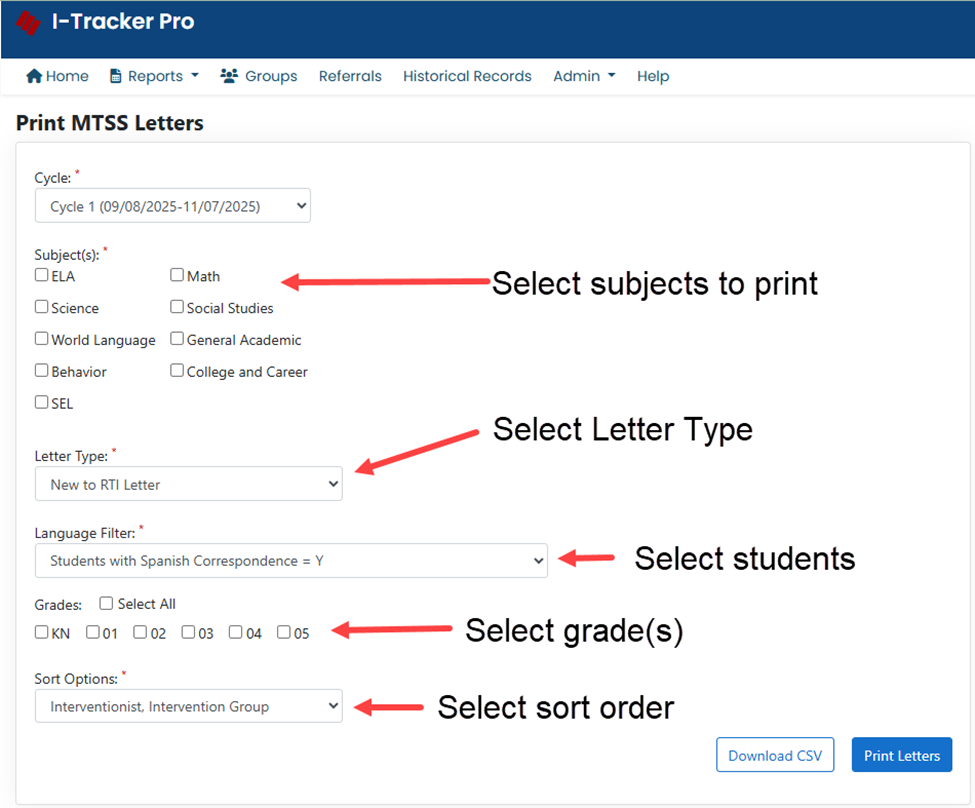
3. Letter Types
a. New to MTSS – this is the only letter type you need to select for Cycle 1; in later cycles, you will select to print letters for any student that has a new intervention plan
b. Continue MTSS – starting in Cycle 2, you will select this option to print letters for students that are continuing with an intervention
c. Move to Tier 1 – this letter type is for students that have completed their intervention and have moved to Tier 1
4. Language Filter
a. All Students – print an English version of the letter for all students
b. Students with Spanish Correspondence = N – if you have an English version and Spanish version of the letter, this option will print letters for students that require an English letter
c. Students with Spanish Correspondence = Y – this option will print the Spanish version of the letter for students requiring Spanish correspondence.
5. Sort Options
a. Interventionsist, Intervention Group – sort your letters by intervention group.
b. Homeroom – sort letters by homeroom. If a student has multiple intervention groups, the letters will be grouped together for that student.
c. Alpha by School – letters printed in alphabetical order. If a student has multiple intervention groups, the letters will be grouped together for that student.
d. Zip Code – letters generated in zip code order used for bulk mailing purposes. If a student has multiple intervention groups, the letters will be grouped together for that student.